Whether you're new to creating support knowledge base articles in AEM or just need a refresher, this training hub is your go-to resource. You'll find best practices for writing and formatting accessible support content, along with step-by-step video guides to help you confidently publish articles on mheducation.com
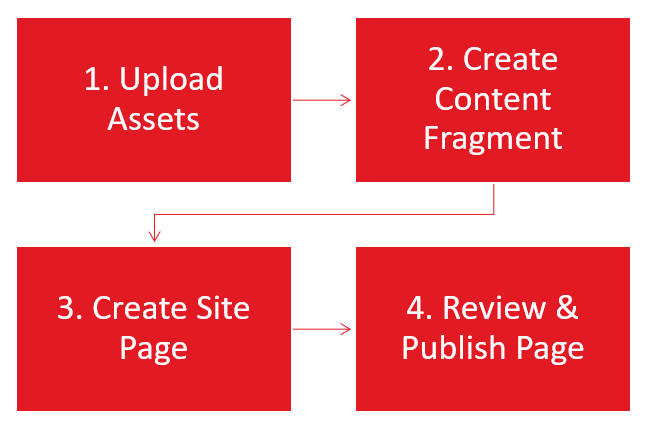
Support Article AEM Process Overview
Step 1: Upload Assets
Upload article assets such as PDFs or images into the DAM.
Step 2: Create Content Fragment
Create the support article content fragment and publish it.
Step 3: Create Site Page
Create the support article site page with the content fragment using a Workflow to generate the page automatically.
Step 4: Review & Publish Page
Review the support site page and use Workflow to request publication. Note: you can schedule it for future publication in this step.
Accessibility means making sure everyone can use your content.
Pages created using WCAG 2.2 guidelines work better for people who use screen readers, keyboards, captions, or other assistive tools. Accessible content is easier to read, navigate, and understand, and it helps meet legal and organizational requirements.
In AEM, small authoring choices like headings, text alternatives, and link text can make a big difference for users.

Content Gathering Toolkit
Before creating a blog post in AEM, start by gathering content based on the required fields. Use this Toolkit to streamline content gathering.
How Create or Edit a Support Article in AEM
AEM Training Videos
- Watch step-by-step videos with expert nariation.
- Use the "Guide Me" button in the bottom right corner of each video to launch step-by-step walkthroughs.
- First-time users: it will prompt you to install the Scribe extension (quick and easy).
Still have questions? Email an AEM expert: DCMteam@mheducation.com (expect responses within 24 hours during standard business hours)
Click the arrow icon in the lower right corner of any video to launch a guided walkthrough. This will open a side panel with step-by-step instructions: