Common causes and solutions for missing verification emails.
Tags
Higher Education
Customer Support
Getting Started & Orientation
Registration
ALEKS
Higher Ed Student
Higher Ed Administrator
Instructor
Share:
Issue: You are not receiving a verification email to your inbox.
Solutions
Solution 1: Check Spam/Junk Folder
Your verification email may have been filtered by your email provider. Check your Spam or Junk folder for an email from McGraw Hill ALEKS <support-noreply@aleks.com> and mark it as "Not Spam" if found to ensure future emails are delivered to your inbox.
Solution 2: Update Your Email Address
If you still have not received the verification email, try using a different email address by following the steps below.
Steps to Change Your Email Address:
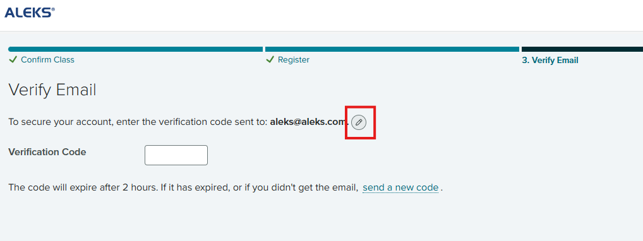
If you’re still on the registration page below, click on the edit icon next to your email address, update your email address and click on Save and Resend Code.
If you’re no longer on the registration page:
Log in to your ALEKS account
Click on your name in the top right corner of the screen and select Settings
Click Edit next to your email address
Enter your current password, update your email address, and click Save
Back on the Settings page, click the Verify button next to your email address to send a new verification email to your updated address
Help us improve!
Let us know how we can improve our support information by providing feedback in this short survey.
Top
Regional Page Available
It looks like you're outside the United States. Do you want to see your regional version of this page?
aleks
student
instructor
Asset Format Type
Asset Format Type/Customer Support
Business Unit
Business Unit/Higher Education
Personas
Personas/Higher Ed Student
Support Topics
Support Topics/Getting Started & Orientation
Support Topics/Getting Started & Orientation/Registration
Personas/Higher Ed Educator
Personas/Higher Ed Educator/Instructor
Programs & Solutions
Programs & Solutions/ALEKS
Personas/Higher Ed Educator/Higher Ed Administrator
highered
2026-10-02T17:33:26.333-04:00
<p>Issue: You are not receiving a verification email to your inbox.</p> <p>Solutions</p> <p>Solution 1: Check Spam/Junk Folder</p> <p>Your verification email may have been filtered by your email provider. Check your Spam or Junk folder for an email from McGraw Hill ALEKS <<a href="mailto:support-noreply@aleks.com">support-noreply@aleks.com</a>> and mark it as "Not Spam" if found to ensure future emails are delivered to your inbox.</p> <p>Solution 2: Update Your Email Address</p> <p>If you still have not received the verification email, try using a different email address by following the steps below.</p> <p>Steps to Change Your Email Address:<br> <br> If you’re still on the registration page below, click on the edit icon next to your email address, update your email address and click on Save and Resend Code.</p> <p><img src="/content/dam/mhe/support/support-images/2026/email-verification.png" data-assetref="email-verification-1791389137340"> </p> <p>If you’re no longer on the registration page:</p> <ol> <li>Log in to your ALEKS account</li> <li>Click on your name in the top right corner of the screen and select Settings</li> <li>Click Edit next to your email address</li> <li>Enter your current password, update your email address, and click Save</li> <li>Back on the Settings page, click the Verify button next to your email address to send a new verification email to your updated address</li> </ol> dts Not receiving your verification email? Learn the common causes and step-by-step fixes to resolve email delivery issues fast. 2026-10-02 Not Receiving Verification Email Not receiving your verification email? Learn the common causes and step-by-step fixes to resolve email delivery issues fast. Common causes and solutions for missing verification emails.
Common causes and solutions for missing verification emails.
Issue: You are not receiving a verification email to your inbox. Solutions Solution 1: Check Spam/Junk Folder Your verification email may have been filtered by your email provider. Check your Spam or Junk folder for an email from McGraw Hill ALEKS <support-noreply@aleks.com> and mark it as "Not Spam" if found to ensure future emails are delivered to your inbox. Solution 2: Update Your Email Address If you still have not received the verification email, try using a different email address by following the steps below. Steps to Change Your Email Address: If you’re still on the registration page below, click on the edit icon next to your email address, update your email address and click on Save and Resend Code. If you’re no longer on the registration page: Log in to your ALEKS account Click on your name in the top right corner of the screen and select Settings Click Edit next to your email address Enter your current password, update your email address, and click Save Back on the Settings page, click the Verify button next to your email address to send a new verification email to your updated address
dts
Higher Education, Customer Support, Getting Started & Orientation, Registration, ALEKS, Higher Ed Student, Higher Ed Administrator, Instructor