Review World of Wonders rubrics used to assess student work, writing, and performance tasks.
Tags
Literacy
SSO & Manual-Rostering
Customer Support
Online Assessments
World of Wonders 2017
Direct Login & Auto-Rostering
Core
Direct Login & Manual-Rostering
Classroom Teacher
SSO & Auto-Rostering
PreK-12
Preschool
Tools & Resources
Grades & Assignments
PreK
Share:
Use unit checklists to focus attention on the key academic goals taught in each unit. Use the Retelling Rubric to evaluate children's listening comprehension and understanding of basic story structure.
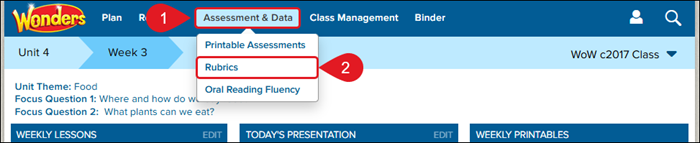
1. Hover over Assessment & Data in the Navigation Banner.
2. Click on Rubrics from the drop menu.
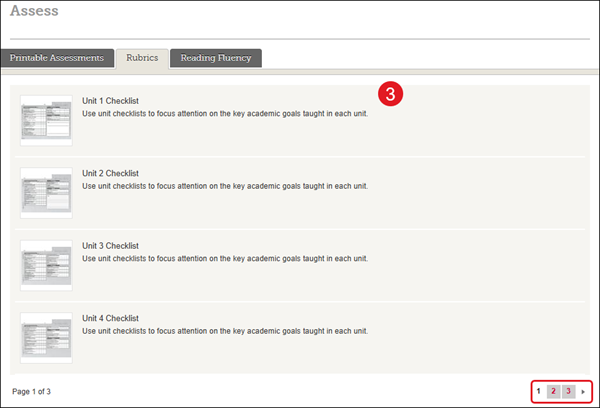
3. Click on the rubric option you would like to open and/or print. Use the navigation at the bottom right of the screen to navigate through the pages of available assessment forms.
Help us improve!
Let us know how we can improve our support information by providing feedback in this short survey.
Top
Regional Page Available
It looks like you're outside the United States. Do you want to see your regional version of this page?
Support Topics/Assessments & Reporting/Grades & Assignments
Support Topics/Assessments & Reporting/Online Assessments
Context/Education Level/Preschool/PreK
Programs & Solutions
Programs & Solutions/World of Wonders
Programs & Solutions/World of Wonders/World of Wonders 2017
Context/Integration Type/SSO & Manual-Rostering
prek-12
2026-03-24T19:03:17.935-03:00
<p>Use unit checklists to focus attention on the key academic goals taught in each unit. Use the Retelling Rubric to evaluate children's listening comprehension and understanding of basic story structure.</p> <p>1. Hover over <strong>Assessment & Data</strong> in the Navigation Banner.</p> <p>2. Click on <strong>Rubrics </strong>from the drop menu.</p> <p><img src="/content/dam/mhe/support/support-images/migrated/rtaImage--2145526866.jpeg" data-assetref="rtaImage--2145526866-1780059878360"></p> <p>3. Click on the rubric option you would like to open and/or print. Use the navigation at the bottom right of the screen to navigate through the pages of available assessment forms. </p> <p><img src="/content/dam/mhe/support/support-images/migrated/rtaImage--2145524698.jpeg" data-assetref="rtaImage--2145524698-1780059878360"></p> dts World Of Wonders Rubrics: step-by-step guidance, requirements, and tips to help you complete this task successfully. 2025-11-21 Create World of Wonders Rubrics World Of Wonders Rubrics: step-by-step guidance, requirements, and tips to help you complete this task successfully. Review World of Wonders rubrics used to assess student work, writing, and performance tasks.
Review World of Wonders rubrics used to assess student work, writing, and performance tasks.
Use unit checklists to focus attention on the key academic goals taught in each unit. Use the Retelling Rubric to evaluate children's listening comprehension and understanding of basic story structure. 1. Hover over Assessment & Data in the Navigation Banner. 2. Click on Rubrics from the drop menu. 3. Click on the rubric option you would like to open and/or print. Use the navigation at the bottom right of the screen to navigate through the pages of available assessment forms.
dts
Literacy, SSO & Manual-Rostering, Customer Support, Online Assessments, World of Wonders 2017, Direct Login & Auto-Rostering, Core, Direct Login & Manual-Rostering, Classroom Teacher, SSO & Auto-Rostering, PreK-12, Preschool, Tools & Resources, Grades & Assignments, PreK