mcgraw hill social studies
illustrative math
5 steps to a 5 - ap test prep
impact social studies
arrive math
reveal math (k-12)
ap-edition
5-steps-to-a-5-test-prep
glencoe-health
teen-health
arrive-math
building-blocks
number-worlds
reading-laboratory
reading-mastery
mcgraw-hill-literacy
open-court-reading
reveal-math
illustrative-math
mcgraw-hill-math
inspire-science
mcgraw-hill-science
impact
mh-social-studies
all-sorts
asi-se-dice
mcgraw-hill-cte
level-up
instructor
Programs & Solutions
Programs & Solutions/McGraw Hill Social Studies
Business Unit
Business Unit/PreK-12
Programs & Solutions/AP Edition
Programs & Solutions/AP Edition/AP Precalculus
Context
Context/Education Level
Context/Education Level/High School
Context/Subject
Context/Subject/Science
Context/Integration Type
Context/Integration Type/Direct Login & Auto-Rostering
Programs & Solutions/AP Edition/AP Biology
Programs & Solutions/AP Edition/AP Music Theory
Context/Integration Type/SSO & Auto-Rostering
Programs & Solutions/Glencoe Health
Programs & Solutions/Glencoe Health/Glencoe Health 2022
Programs & Solutions/Open Court Reading
Programs & Solutions/Open Court Reading/Open Court Reading 2025
Programs & Solutions/Impact Social Studies
Programs & Solutions/Impact Social Studies/CA Impact 2019
Programs & Solutions/McGraw Hill Social Studies/FL Social Studies 2024 (K-12)
Context/Subject/World Languages
Programs & Solutions/Illustrative Math
Programs & Solutions/McGraw Hill CTE
Programs & Solutions/McGraw Hill CTE/CTE - Culinary Arts
Asset Format Type
Asset Format Type/Customer Support
Context/Curriculum Type
Context/Curriculum Type/Supplemental
Programs & Solutions/AP Edition/AP Statistics
Programs & Solutions/McGraw Hill Science
Programs & Solutions/McGraw Hill Science/TX Science 2025 (K-12)
Programs & Solutions/AP Edition/AP Public Speaking
Context/Subject/Health
Programs & Solutions/5 Steps to a 5 - AP Test Prep
Programs & Solutions/Asi Se Dice
Programs & Solutions/Asi Se Dice/Asi se Dice 2024
Programs & Solutions/All Sorts
Programs & Solutions/All Sorts/All Sorts 2026 (K-5)
Support Topics
Support Topics/Tools & Product Integrations
Support Topics/Tools & Product Integrations/Tools & Resources
Programs & Solutions/Level Up
Programs & Solutions/Level Up/Level Up 9–12
Context/Curriculum Type/Career & Technical Education
Programs & Solutions/McGraw Hill Literacy
Programs & Solutions/McGraw Hill Literacy/McGraw Hill Literacy Soar!
Programs & Solutions/McGraw Hill CTE/CTE - Agriculture
Context/Subject/Math
Programs & Solutions/McGraw Hill Math
Programs & Solutions/McGraw Hill Math/Texas Math
Context/Curriculum Type/AP, Honors & Electives
Programs & Solutions/AP Edition/AP Chemistry
Context/Curriculum Type/Intervention
Programs & Solutions/Building Blocks
Programs & Solutions/Building Blocks/Building Blocks 2024
Programs & Solutions/McGraw Hill CTE/CTE - Computing and Technology
Programs & Solutions/Arrive Math
Support Topics/Classroom & Course Management
Support Topics/Classroom & Course Management/Plan & Present
Context/Integration Type/Direct Login & Manual-Rostering
Context/Curriculum Type/Core
Programs & Solutions/AP Edition/AP Language and Composition
Context/Subject/Literacy
Programs & Solutions/McGraw Hill CTE/CTE - Health Science
Programs & Solutions/AP Edition/AP History & Geography
Programs & Solutions/Inspire Science
Programs & Solutions/Inspire Science/Inspire Science 2020
Context/Subject/Visual & Performing Arts
Programs & Solutions/AP Edition/AP Computer Science
Context/Subject/Social Studies
Programs & Solutions/Reveal Math (K-12)
Programs & Solutions/Reveal Math (K-12)/CA Reveal Math (K-12)
Context/Education Level/Middle School
Programs & Solutions/McGraw Hill CTE/CTE - Early Childhood Education
Programs & Solutions/McGraw Hill Literacy/McGraw Hill Literacy Emerge!
Context/Education Level/Preschool
Programs & Solutions/AP Edition/AP African American Studies
Programs & Solutions/McGraw Hill Science/FL Science 2025 (K-12)
Programs & Solutions/McGraw Hill CTE/CTE - Business, Marketing, and Finance
Context/Education Level/Elementary School
Programs & Solutions/Number Worlds
Programs & Solutions/Number Worlds/Number Worlds 2024
Programs & Solutions/Level Up/Level Up K–5
Programs & Solutions/McGraw Hill Literacy/McGraw Hill Literacy Summit!
Personas
Personas/School Educator
Personas/School Educator/Classroom Teacher
Programs & Solutions/Reading Laboratory
Programs & Solutions/Reading Laboratory/SRA Reading Laboratory 2025
Support Topics/Classroom & Course Management/Dashboard & Navigation Overview
Programs & Solutions/AP Edition/AP Economics
Programs & Solutions/Building Blocks/Building Blocks PreK 2025
Programs & Solutions/AP Edition/AP Psychology
Programs & Solutions/McGraw Hill Science/TN Science (K-12)
Programs & Solutions/Teen Health
Programs & Solutions/Teen Health/Teen Health 2021
Programs & Solutions/McGraw Hill CTE/CTE - Criminal Justice
Programs & Solutions/Inspire Science/CA Inspire Science 2020
Programs & Solutions/Reading Mastery
Programs & Solutions/Reading Mastery/SRA Reading Mastery Transformations
Programs & Solutions/Level Up/Level Up 6–8
Context/Integration Type/SSO & Manual-Rostering
prek-12
2026-09-15T11:01:36.596-04:00
<h2 class="fs-5">Article Contents</h2> <p><a href="#navigate_calendar">Navigate the Calendar</a></p> <p><a href="#add_events">Add Events</a></p> <p><a href="#add_resources">Add Lesson Materials</a></p> <p><a href="https://www.mheducation.com/prek-12/support/knowledge/open-learning---create-assignments.html" target="_blank">Add Assignments</a></p> <p> </p> <h3 class="fs-5"><span style="font-weight: normal; width: 11px; overflow: hidden; background-image: url("/libs/clientlibs/granite/richtext/resources/images/anchor.png"); background-position: left bottom; background-size: initial; background-repeat: no-repeat; background-attachment: initial; background-origin: initial; background-clip: initial; height: 12px;"><a id="navigate_calendar"></a></span>Navigate the Calendar</h3> <p>You can view the teacher calendar from the course <strong>Dashboard</strong>.</p> <p><img src="/content/dam/mhe/support/support-images/dts-k12-images/navigate-the-ol-te-calendar/ol-te-calendar-2.jpg" data-assetref="ol-te-calendar-2-1789478280246"></p> <p>You can also click <strong>Calendar </strong>on the navigation menu to access the full version.</p> <p><img src="/content/dam/mhe/support/support-images/dts-k12-images/navigate-the-ol-te-calendar/ol-te-calendar-1.jpg" data-assetref="ol-te-calendar-1-1789477660828"></p> <p><img src="/content/dam/mhe/support/support-images/dts-k12-images/navigate-the-ol-te-calendar/ol-te-calendar-3.jpg" data-assetref="ol-te-calendar-3-1789478545886"></p> <ol class="list-type-alphabet-uppercase"> <li>The calendar will automatically default to <strong>Today </strong>(the current day).<br> <br> </li> <li>The <strong>View </strong>will also default to <strong>Day</strong>. Click the drop-down to navigate between viewing by <strong>Day</strong>, <strong>Week</strong>, or <strong>Month</strong>.<br> <br> </li> <li>Click the back-and-forth arrows to the left and right of the calendar day to navigate between the days, weeks, or months.<br> <br> </li> <li>Click the <strong>Grid </strong>or <strong>List </strong>buttons to toggle between the <strong>Display </strong>options.<br> <br> </li> <li>Click the <strong>Add Event</strong> button to add a school event or non-teaching day to the calendar.<br> <br> </li> <li>Click the <strong>Go to Legend</strong> button to navigate to the bottom of the calendar page to view what each icon means in the calendar.<br> <br> <img src="/content/dam/mhe/support/support-images/dts-k12-images/navigate-the-ol-te-calendar/ol-te-calendar-4.jpg" data-assetref="ol-te-calendar-4-1789478902562"><br> <br> </li> <li>* Click the <strong>Edit </strong>button (pencil icon) to the right of an event, assignment, or lesson material to make changes to the settings and/or dates.<br> <br> </li> <li>* Click on an <strong>Assignment </strong>title to navigate to the Assignment Details page or on a <strong>Lesson Materials</strong> title to open the resource.<br> <br> *To view the edit option or launch the assignment or lesson material from the Grid Display option, you will first need to click on the day it's assigned. This will open the selection on the right side of the calendar.<br> <br> <img src="/content/dam/mhe/support/support-images/dts-k12-images/navigate-the-ol-te-calendar/ol-te-calendar-5.jpg" data-assetref="ol-te-calendar-5-1789479342938"></li> </ol> <p> </p> <h3 class="fs-5"><span style="font-weight: normal; width: 11px; overflow: hidden; background-image: url("/libs/clientlibs/granite/richtext/resources/images/anchor.png"); background-position: left bottom; background-size: initial; background-repeat: no-repeat; background-attachment: initial; background-origin: initial; background-clip: initial; height: 12px;"><a id="add_events"></a></span>Add Events</h3> <ol> <li>Click the <strong>Add Events</strong> link.<br> <br> <img src="/content/dam/mhe/support/support-images/dts-k12-images/navigate-the-ol-te-calendar/ol-te-calendar-6.jpg" data-assetref="ol-te-calendar-6-1789479766229"><br> <br> </li> <li>Select the <strong>Event Type</strong> radio button.<br> <br> </li> <li>Enter an <strong>Event Title</strong>.<br> <br> </li> <li>Select the <strong>Start </strong>and <strong>End Date</strong>.<br> <br> </li> <li>Enter an <strong>Event Description</strong>. This is optional.<br> <br> </li> <li>Uncheck the <strong>Show on Student Calendar</strong> if you do not want students to see the event on their calendar.<br> <br> </li> <li>Click the <strong>Add Event</strong> button.<br> <br> <img src="/content/dam/mhe/support/support-images/dts-k12-images/navigate-the-ol-te-calendar/ol-te-calendar-7.jpg" data-assetref="ol-te-calendar-7-1789479934381"></li> </ol> <p> </p> <h3 class="fs-5"><a id="add_resources"></a>Add Lesson Materials</h3> <ol> <li>Navigate to the lesson resource either from the <a href="https://www.mheducation.com/prek-12/support/knowledge/manage-course-content.html" target="_blank"><strong>Course </strong>page</a> or the <strong><a href="https://www.mheducation.com/prek-12/support/knowledge/my-mheducation-com-teacher-resources.html" target="_blank">Course Resources</a></strong>.<br> <br> </li> <li>Click on the <strong>Options </strong>button on the resource tile.<br> <br> </li> <li>Click <strong>Add to Calendar</strong> from the menu.<br> <br> <img src="/content/dam/mhe/support/support-images/dts-k12-images/navigate-the-ol-te-calendar/ol-te-calendar-8.jpg" data-assetref="ol-te-calendar-8-1789480342025"><br> <br> </li> <li>Select a <strong>Start </strong>and <strong>End Date</strong>.<br> <br> </li> <li>Click the <strong>Add to Calendar</strong> button.<br> <br> <img src="/content/dam/mhe/support/support-images/dts-k12-images/navigate-the-ol-te-calendar/ol-te-calendar-9.jpg" data-assetref="ol-te-calendar-9-1789480471292"><br> <br> Students will be able to see all Lesson Materials added to the calendar, except for any that are labeled as <strong>Teacher Only</strong> on the resource tile.<br> <br> <img src="/content/dam/mhe/support/support-images/dts-k12-images/navigate-the-ol-te-calendar/ol-te-calendar-10.jpg" data-assetref="ol-te-calendar-10-1789480705547"></li> </ol> dts Learn how to access and navigate the teacher calendar for your Open Learning programs. 2026-09-15 Navigate the Open Learning Teacher Calendar Learn how to access and navigate the teacher calendar for your Open Learning programs. Learn how to access and navigate the teacher calendar for your Open Learning programs.
Learn how to access and navigate the teacher calendar for your Open Learning programs.
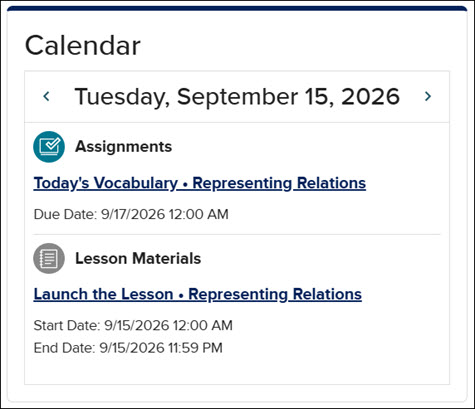
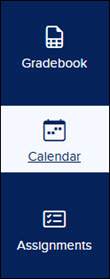
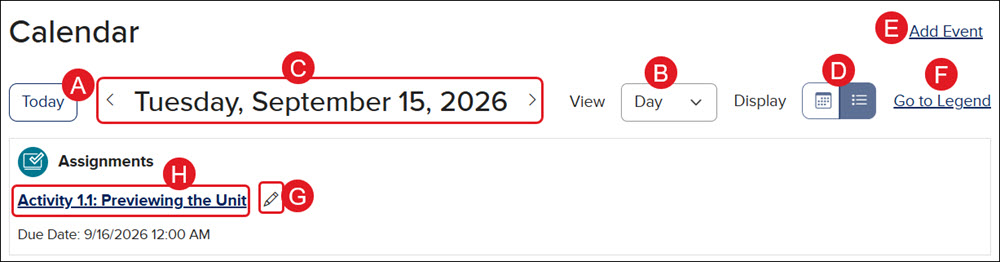
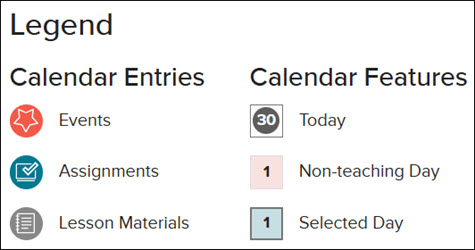
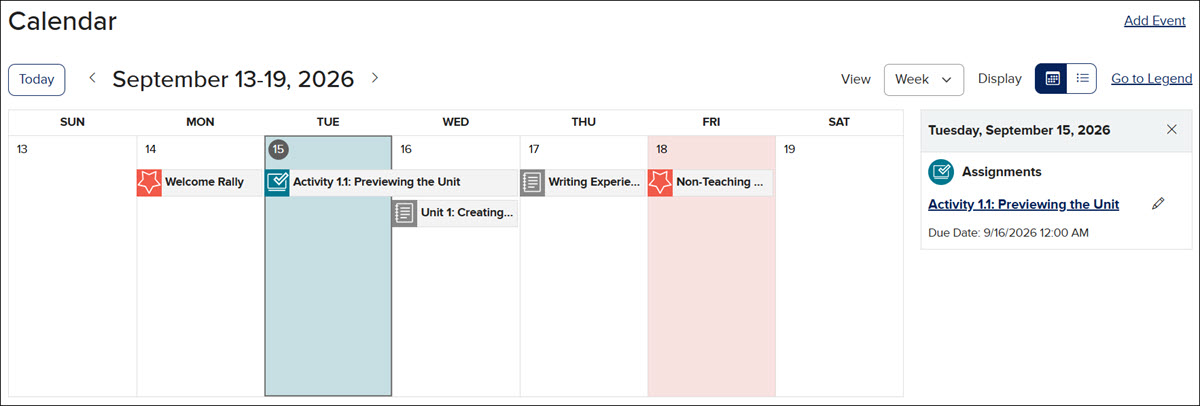
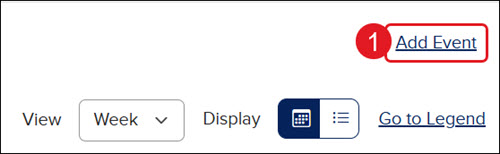
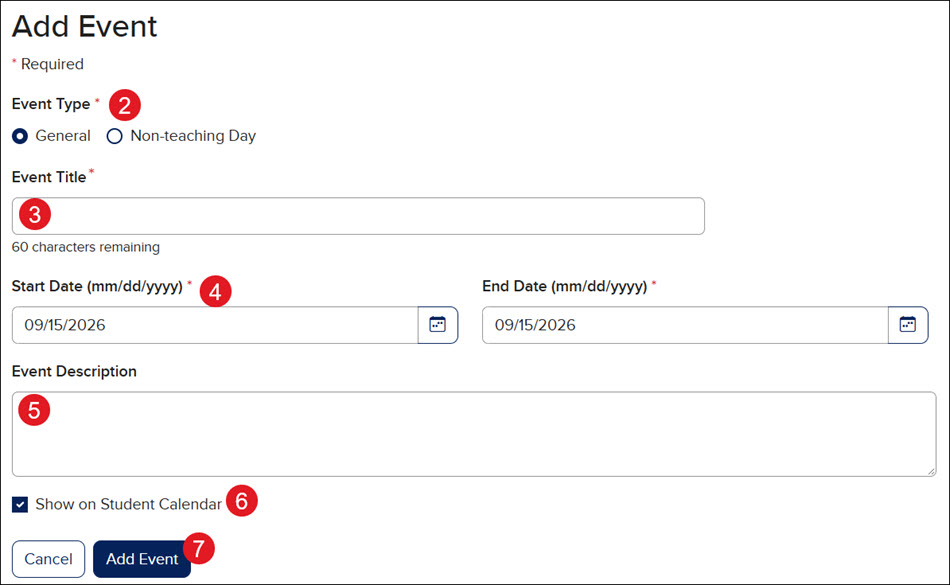
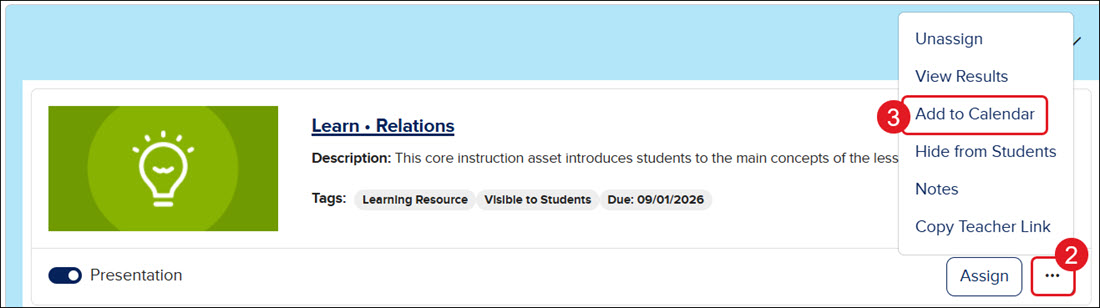
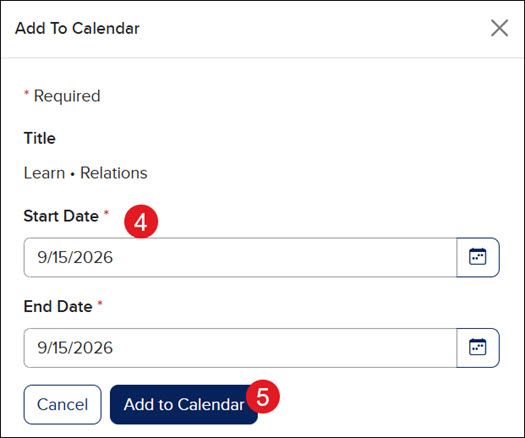
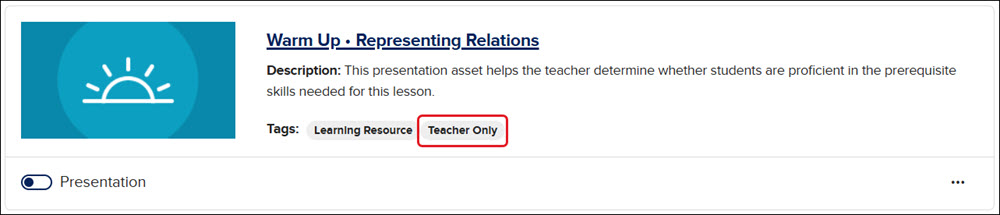
Article Contents Navigate the Calendar Add Events Add Lesson Materials Add Assignments Navigate the Calendar You can view the teacher calendar from the course Dashboard. You can also click Calendar on the navigation menu to access the full version. The calendar will automatically default to Today (the current day). The View will also default to Day. Click the drop-down to navigate between viewing by Day, Week, or Month. Click the back-and-forth arrows to the left and right of the calendar day to navigate between the days, weeks, or months. Click the Grid or List buttons to toggle between the Display options. Click the Add Event button to add a school event or non-teaching day to the calendar. Click the Go to Legend button to navigate to the bottom of the calendar page to view what each icon means in the calendar. * Click the Edit button (pencil icon) to the right of an event, assignment, or lesson material to make changes to the settings and/or dates. * Click on an Assignment title to navigate to the Assignment Details page or on a Lesson Materials title to open the resource. *To view the edit option or launch the assignment or lesson material from the Grid Display option, you will first need to click on the day it's assigned. This will open the selection on the right side of the calendar. Add Events Click the Add Events link. Select the Event Type radio button. Enter an Event Title. Select the Start and End Date. Enter an Event Description. This is optional. Uncheck the Show on Student Calendar if you do not want students to see the event on their calendar. Click the Add Event button. Add Lesson Materials Navigate to the lesson resource either from the Course page or the Course Resources. Click on the Options button on the resource tile. Click Add to Calendar from the menu. Select a Start and End Date. Click the Add to Calendar button. Students will be able to see all Lesson Materials added to the calendar, except for any that are labeled as Teacher Only on the resource tile.
dts
Customer Support, PreK-12, Classroom Teacher, Preschool, Elementary School, Middle School, High School, Direct Login & Auto-Rostering, Direct Login & Manual-Rostering, SSO & Auto-Rostering, SSO & Manual-Rostering, Core, Intervention, Supplemental, AP, Honors & Electives, Career & Technical Education, Literacy, Math, Science, Social Studies, Health, Visual & Performing Arts, World Languages, AP Biology, AP Chemistry, AP History & Geography, AP Psychology, AP Economics, AP African American Studies, AP Precalculus, AP Statistics, AP Computer Science, AP Language and Composition, AP Public Speaking, AP Music Theory, 5 Steps to a 5 - AP Test Prep, Glencoe Health 2022, Teen Health 2021, Arrive Math, Building Blocks 2024, Building Blocks PreK 2025, Number Worlds 2024, SRA Reading Laboratory 2025, SRA Reading Mastery Transformations, McGraw Hill Literacy Emerge!, McGraw Hill Literacy Summit!, McGraw Hill Literacy Soar!, Open Court Reading 2025, CA Reveal Math (K-12), Illustrative Math, Reveal Math (K-12), Texas Math, CA Inspire Science 2020, FL Science 2025 (K-12), Inspire Science 2020, TN Science (K-12), TX Science 2025 (K-12), CA Impact 2019, FL Social Studies 2024 (K-12), Impact Social Studies, McGraw Hill Social Studies, All Sorts 2026 (K-5), Asi se Dice 2024, CTE - Health Science, CTE - Computing and Technology, CTE - Agriculture, CTE - Culinary Arts, CTE - Early Childhood Education, CTE - Criminal Justice, CTE - Business, Marketing, and Finance, Level Up K–5, Level Up 6–8, Level Up 9–12, Plan & Present, Dashboard & Navigation Overview, Tools & Resources