Accessing ALEKS Assignments
Explore the student view of ALEKS assignments, including due dates and progress indicators.
Tags
- Customer Support
- PreK-12
- School Student
- School Parent
- Elementary School
- Middle School
- High School
- Direct Login & Auto-Rostering
- Direct Login & Manual-Rostering
- SSO & Auto-Rostering
- SSO & Manual-Rostering
- Supplemental
- Math
- ALEKS
- Grades & Assignments


1. SSO or sign in at my.mheducation.com, depending on how your account is set up.
2. Launch your ALEKS class.
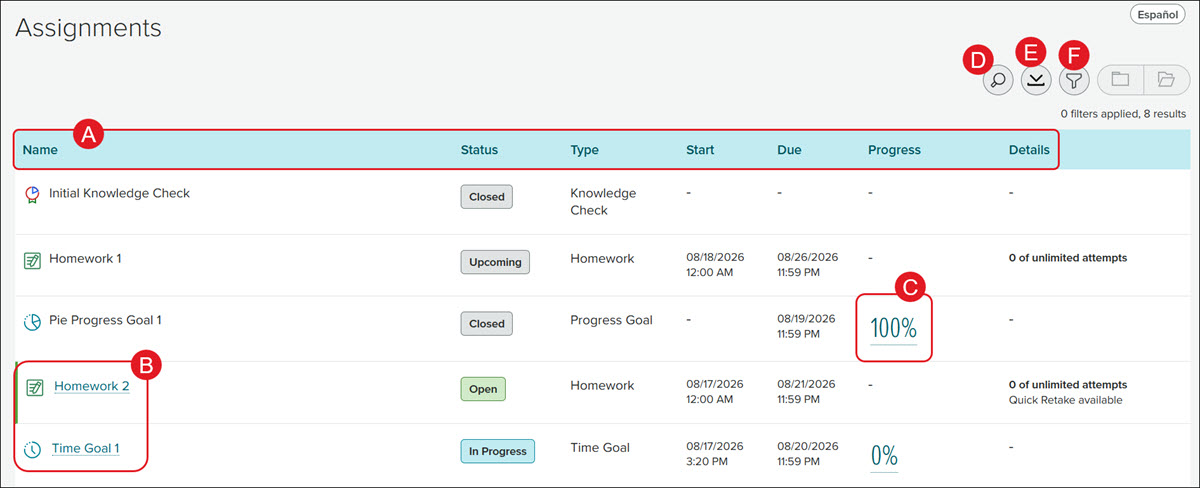
3. Click the Main Menu icon at the top-left.
4. Click on Assignments from the menu.
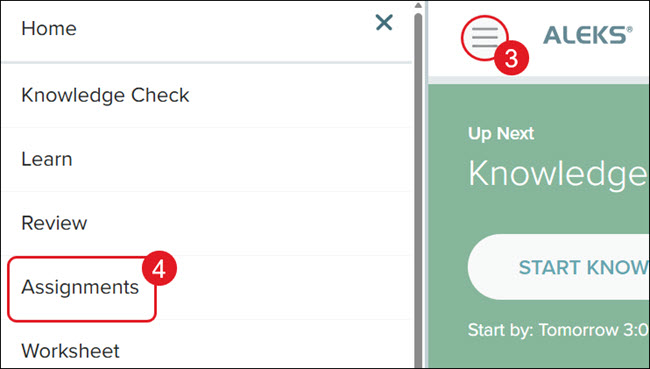
A. The assignments are sorted by the Due Date. Click on a header to sort the list by that column.
B. Click on an active assignment Name to complete it.
C. Click on the Progress link to view the report for that assignment.
D. Click the Search (magnifying glass) icon to locate a specific assignment.
E. Click the Download button to save/print the list of assignments.
F. Click the Filter button to view a specific assignment type or status.