
How to unlink LTI Advantage Student Single Sign On Access
Reset LTI Advantage single sign-on access to resolve login or pairing issues.
Tags
- Higher Ed Student
- Resources
- Higher Education
- Customer Support
- Connect


If you would like to unlink your LTI Advantage Single Sign On access, you can do so by using the Connect Quick Links.
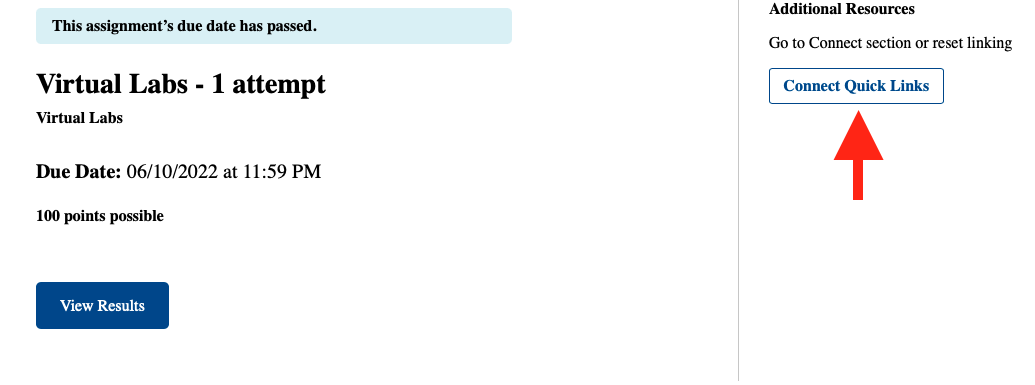
- To access the Connect Quick Links, find and launch any Connect assignment from your LMS (it can be any assignment you completed or haven't started yet).
- On the right-hand side, you will see an Additional Resources section. Click on Connect Quick Links
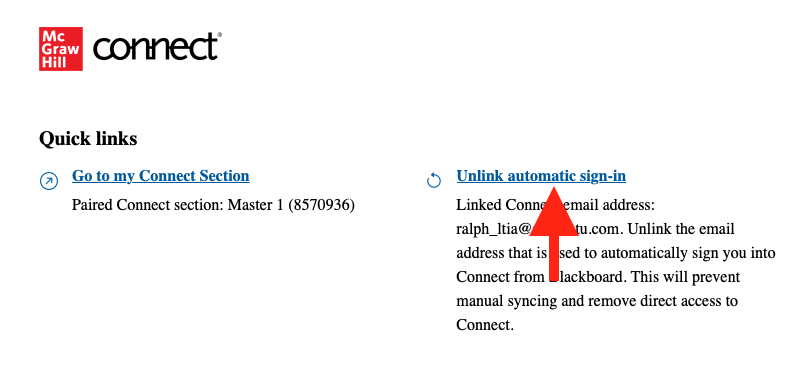
- Click on Unlink automatic sign-in.
If you linked with the wrong account or unlinked your account by accident, you can relink your account again at any time by re-launching an assignment from your LMS and following the on-screen prompts. If you completed any assignments already, please ask your instructor to sync your grades after you pair the correct account.
