
Connect - Student Performance Report
Track individual progress using the Connect Student Performance Report.
Tags
- Higher Education
- Customer Support
- Connect
- Instructor
- Reports & Analytics


See an individual student’s submitted assignment scores, and the status of assignments-in-progress.
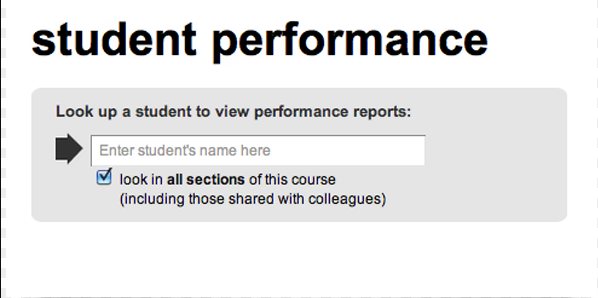
The student performance report helps you search for a specific student in your class and focus on that student’s progress across your assignments.
You can view assignments that have been submitted and any assignments the student currently has in progress, so you’re able to provide guidance or feedback during or after an assignment.
Related Topics:
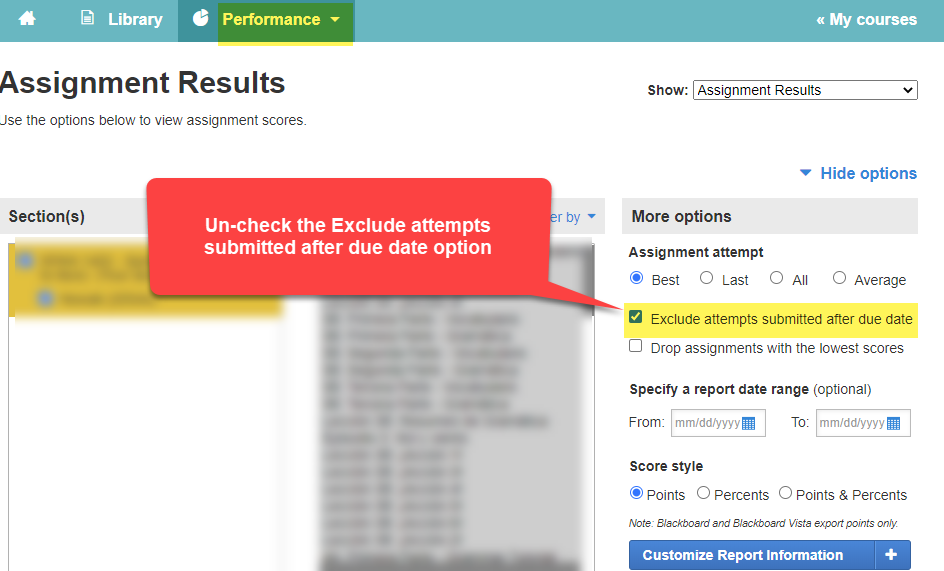
Note: If a student has submitted an assignment after the due date, you will need to un-check the Exclude attempts submitted after the due date option within your Assignment Results report and then access the Student performance report again.
The student performance report helps you search for a specific student in your class and focus on that student’s progress across your assignments.
You can view assignments that have been submitted and any assignments the student currently has in progress, so you’re able to provide guidance or feedback during or after an assignment.
Related Topics:
Note: If a student has submitted an assignment after the due date, you will need to un-check the Exclude attempts submitted after the due date option within your Assignment Results report and then access the Student performance report again.