
Connect - Stop Sharing an Assignment
Stop sharing a Connect assignment that was previously shared with another section or instructor.
Tags
- Higher Education
- Customer Support
- Connect
- Instructor
- Assignment Management


In your section Assignments list, locate the Shared assignment that you want to stop sharing and select Stop sharing.
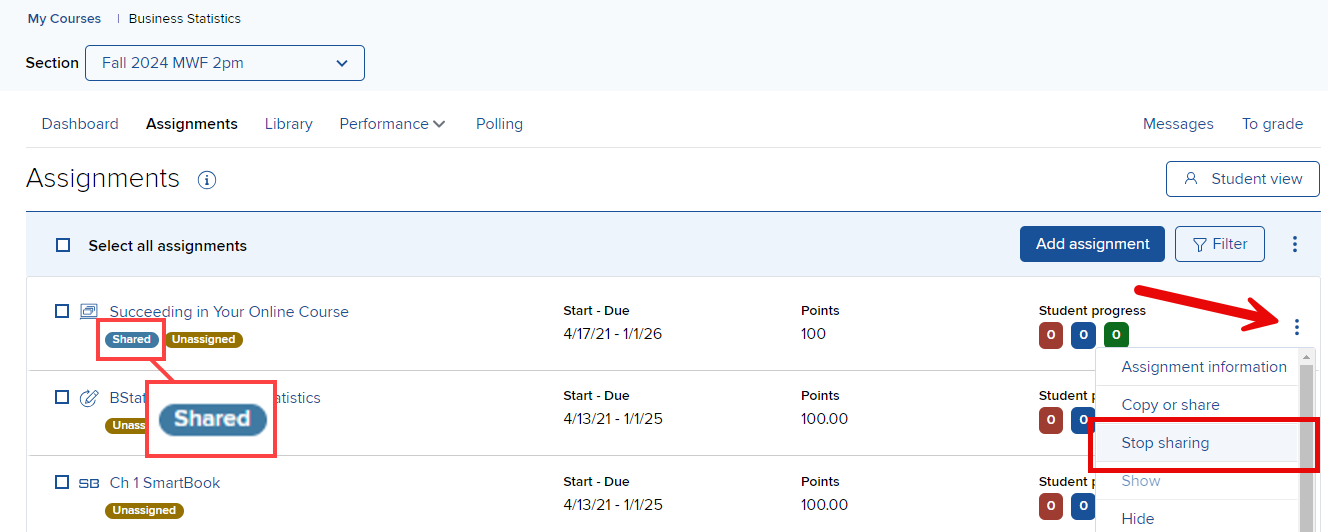
Check the section(s) you want to stop sharing the assignment with and click stop sharing. Click OK in the confirmation window that appears. Connect will provide a confirmation message that the assignment is no longer being shared.
Best Practices:
It's easy to stop sharing an assignment you have shared with a colleague. When you stop sharing an assignment, your colleague can no long see the changes you make to it (questions, policies and more).
