
Connect - Copy a Section To Colleague(s)
Share a Connect section by copying it for colleagues.
Tags
- Higher Ed Student
- Higher Education
- Customer Support
- Connect
- Course Management
- Instructor


Copying
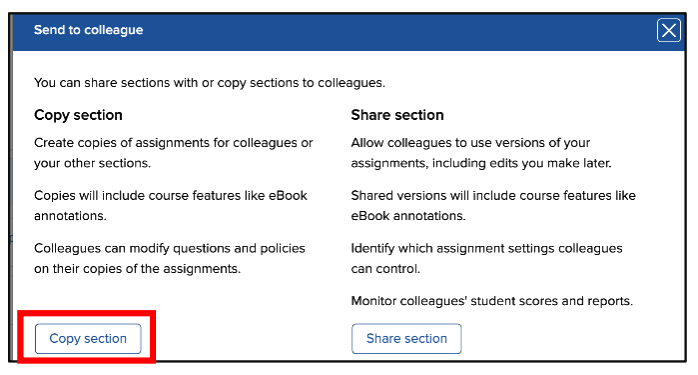
COPYING a section provides your colleague with a duplicate of your course section. It is a one-time, one-direction transaction, a template. Any course features and assignments in your section at that time will be reflected in the copy. Your colleague can edit anything within the copied section.
Send to colleague options:
To Copy a Section
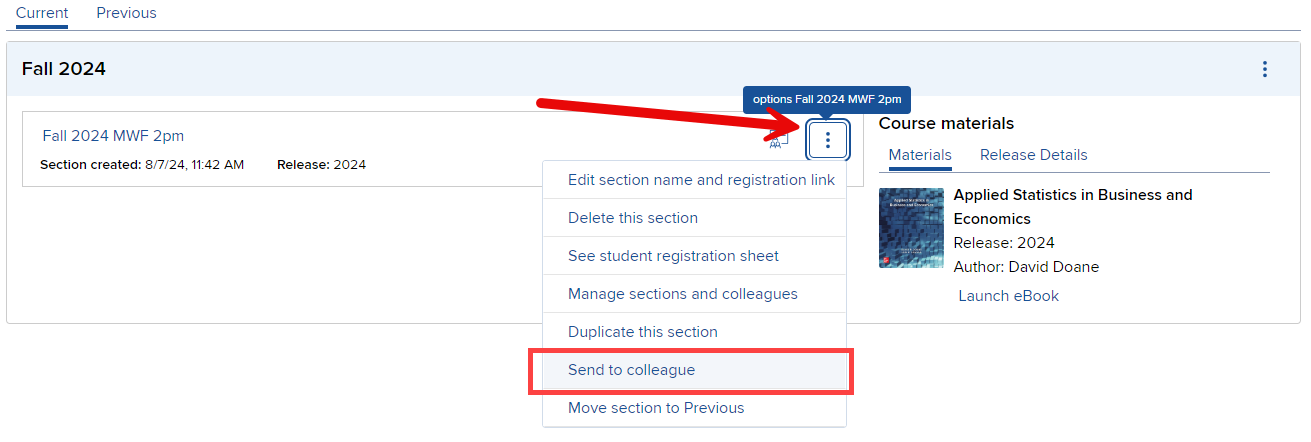
Locate your course and section. Click on the Section Options menu. To copy your section into a colleague’s Connect account, choose Send to colleague. To copy, select Copy section from the Send to colleague options screen.
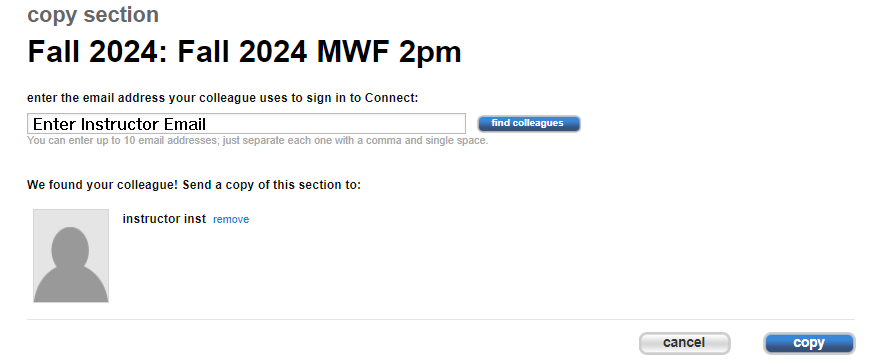
Enter the email address used by your colleague. Select Find Colleagues. Select Copy when you’ve found your colleague.
COPYING a section provides your colleague with a duplicate of your course section. It is a one-time, one-direction transaction, a template. Any course features and assignments in your section at that time will be reflected in the copy. Your colleague can edit anything within the copied section.
Send to colleague options:
To Copy a Section
Locate your course and section. Click on the Section Options menu. To copy your section into a colleague’s Connect account, choose Send to colleague. To copy, select Copy section from the Send to colleague options screen.
Enter the email address used by your colleague. Select Find Colleagues. Select Copy when you’ve found your colleague.
