Manage the assignment list in Connect, including reordering, hiding, or organizing assignments.
Tags
Higher Education
Customer Support
Connect
Instructor
Assignment Management
Share:
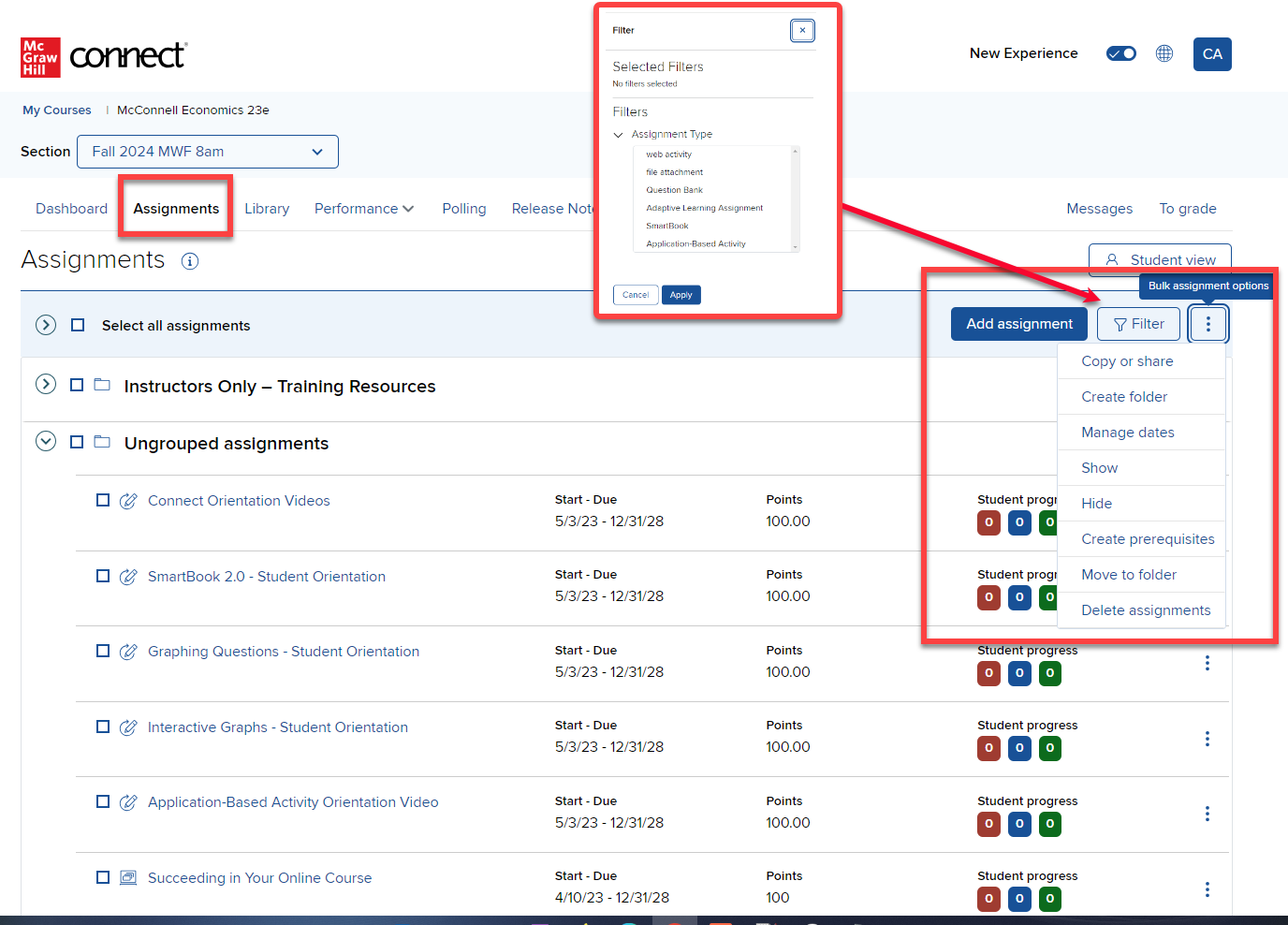
All assignments are listed on your Section Home page and you can re-order assignments by clicking and dragging to a different place on the list. You can select more than one assignment using the check boxes
You can also filter assignments from the filter menu. View only prerequisite assignments or just assignments that require manual grading.
Let us know how we can improve our support information by providing feedback in this short survey.
Top
Regional Page Available
It looks like you're outside the United States. Do you want to see your regional version of this page?
connect
instructor
Personas
Personas/Higher Ed Educator
Personas/Higher Ed Educator/Instructor
Support Topics
Support Topics/Classroom & Course Management
Support Topics/Classroom & Course Management/Assignment Management
Asset Format Type
Asset Format Type/Customer Support
Business Unit
Business Unit/Higher Education
Programs & Solutions
Programs & Solutions/Connect
highered
2026-03-24T18:27:30.288-03:00
<p><span><span>All assignments are listed on your Section Home page and you can re-order assignments by clicking and dragging to a different place on the list. You can select more than one assignment using the <strong>check boxes</strong> </span></span></p> <p><span><span>You can also filter assignments from the <strong>filter menu</strong>. View only prerequisite assignments or just assignments that require manual grading.</span></span></p> <p><span><span><strong>Listed below are your assignment options:</strong></span></span></p> <ul> <li><span><span>Copy or share</span></span></li> <li><span><span>Create folder</span></span></li> <li><span><span>Manage dates</span></span></li> <li><span><span>Show</span></span></li> <li><span><span>Hide</span></span></li> <li><span><span>Create prerequisites</span></span></li> <li><span><span>Move to folder</span></span></li> <li><span><span>Delete assignments.</span></span></li> </ul> <p><img alt="1_AssignmentListManagement.png" src="/content/dam/mhe/support/support-images/migrated/rtaImage-596134988.jpeg" data-assetref="rtaImage-596134988-1787159430617"></p> <h2><strong>Related Topics:</strong></h2> <ul> <li><a href="https://mh.my.site.com/CXG/s/article/Connect-Group-Assignments-in-your-Section-Home" target="_blank">Connect - Group Assignments in your Section Home</a></li> </ul> dts Manage the assignment list in Connect, including reordering, hiding, or organizing assignments. 2025-11-19 Connect - Assignment List Management Manage the assignment list in Connect, including reordering, hiding, or organizing assignments. Manage the assignment list in Connect, including reordering, hiding, or organizing assignments.
Manage the assignment list in Connect, including reordering, hiding, or organizing assignments.
All assignments are listed on your Section Home page and you can re-order assignments by clicking and dragging to a different place on the list. You can select more than one assignment using the check boxes You can also filter assignments from the filter menu. View only prerequisite assignments or just assignments that require manual grading. Listed below are your assignment options: Copy or share Create folder Manage dates Show Hide Create prerequisites Move to folder Delete assignments. Related Topics: Connect - Group Assignments in your Section Home